Site Ready keeps every date that stops a demolition job or loses a tender: operative cards, plant examinations, company certificates and the notices before a job starts. It shows what is out of date today, writes to the person who looks after each date before it runs out, and sends the director one summary on Monday morning. It runs in your own Microsoft 365, and I set it up with you on a Teams call at no charge.
What it keeps
- People: CSCS, CCDO, CPCS and NPORS cards, asbestos refresher training, face fit tests and asbestos medicals. Operatives do not need an account: the office or the supervisor keeps their cards.
- Plant: LOLER thorough examinations, PUWER inspections, scaffold and platform inspections, 110V tool tests and fire extinguisher services, machine by machine.
- Company: CHAS, SafeContractor, SMAS and Constructionline, employers' liability insurance, the waste carrier registration and exemptions, the scrap metal dealer's licence, ISO certificates and the operator licence.
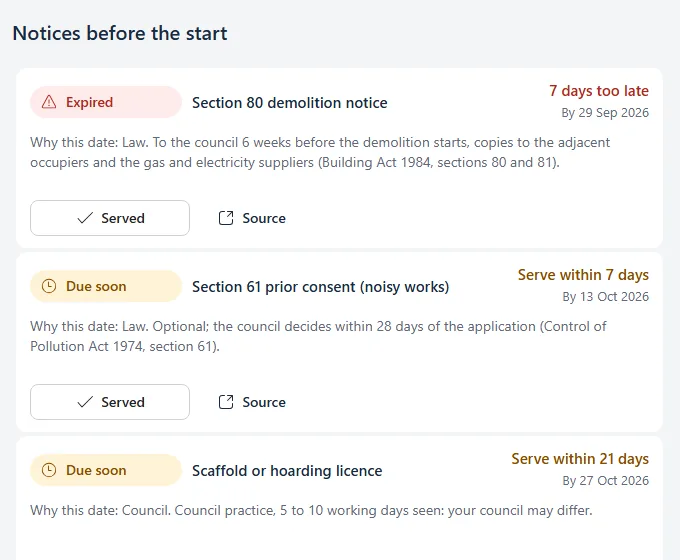
- Jobs: the Section 80 demolition notice, asbestos notifications, the F10, Section 61 consent, party wall notices, scaffold and road licences, each counted back from the day the job starts on site.
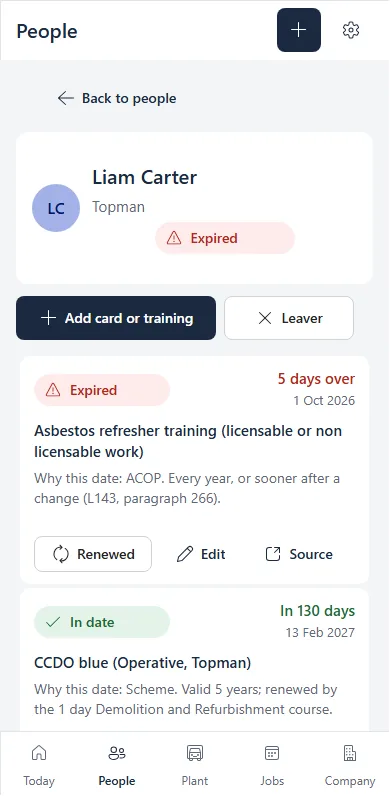
That is 64 kinds of card, examination, certificate and notice for Great Britain. Each one carries its rule, the reason the date is what it is, and a link to where the rule comes from.
How it works
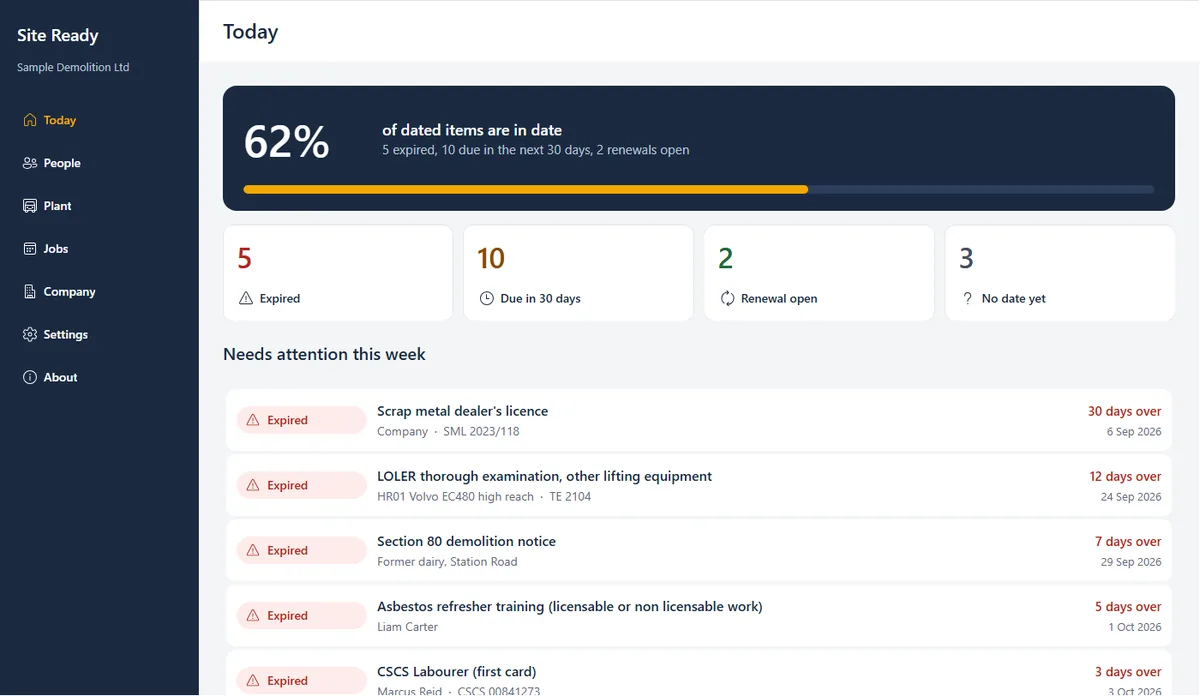
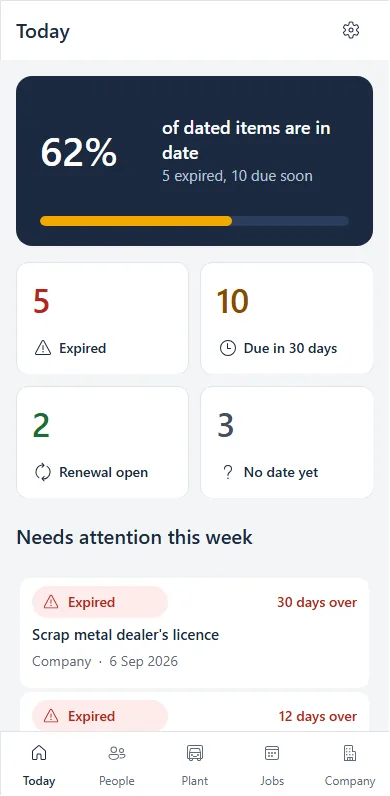
- Today. One figure for the share of dated items in date, four tiles (expired, due in 30 days, renewal open, no date yet) and the list of what needs attention this week.
- Reminders. The person who looks after a date gets a mail a month before it runs out, a week before and on the day. Each mail lists only their items.
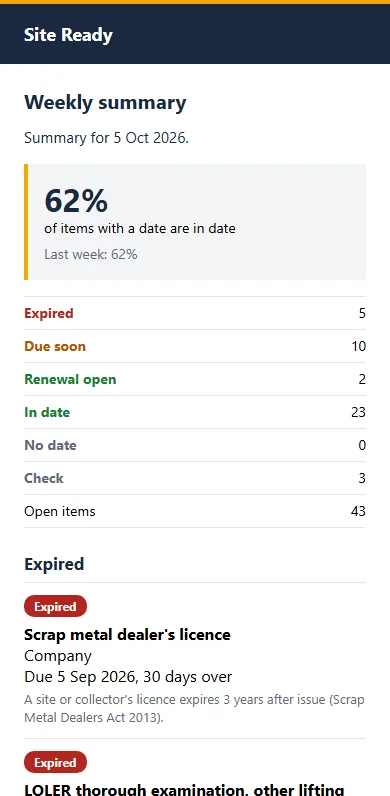
- The Monday summary. The director gets one mail every Monday: the figure against last week, what has expired, what falls due in the next 30 days and which job notices are due.
- Renewed. When a card or certificate is renewed, you record the new one: its expiry date fills in from the rule, the old one stays in the history, and the reminders start again.
- Your spreadsheet. Paste the rows of the spreadsheet you keep today. Every row is checked before anything is written, and a row it cannot read is left out with the reason.
The rules behind the dates
Each date was read on its primary source: the statute, the regulator or the scheme that issues the card. Where a rule is a scheme's own or guidance rather than law, the app says so beside the date. Four examples:
- CCDO Labourer (green) card: valid 2 years since February 2025, when it went down from 5 (National Demolition Training Group). A scheme rule.
- LOLER thorough examination: at least every 6 months for equipment that lifts people, such as a MEWP, and for lifting accessories; at least every 12 months for other lifting equipment, such as an excavator used for lifting; or as an examination scheme sets (LOLER 1998, regulation 9).
- Section 80 demolition notice in England and Wales: to the council 6 weeks before the demolition starts, with copies to the adjacent occupiers and the gas and electricity suppliers (Building Act 1984, sections 80 and 81).
- Upper tier waste carrier registration: renewed every 3 years (GOV.UK).
Your data stays with you
- In your own Microsoft 365. The lists and any photos live on a SharePoint site in your tenant. The app and the reminder flows run in your own Power Platform environment.
- No access for me. I keep no access after the install, and the app sends nothing to me or to anyone else. Reminder mails go from a mailbox of your own.
- Who can see it. Only the people you add to the site's Site Ready Users group, and the site's owners.
- Leavers. Marking someone as a leaver takes them off every screen and stops their reminders. Their records stay on your SharePoint site as history until you delete them from the People and Register lists, and their photos from the Evidence library, when your retention period ends.
- Your records, your rules. The details of your operatives are personal data your firm already holds. Site Ready changes where they are kept, not who is responsible for them.
What it needs
- Microsoft 365 with Power Apps and Power Automate included: Business Basic, Business Standard, Business Premium, E3, E5 or F3. F1 does not include them (Microsoft service description).
- A licence only for those who open it: the office, the directors and the supervisors.
- Nothing new to buy: SharePoint, Outlook and the standard Power Apps and Power Automate connectors, no premium licence.
- Your administrator on the call: they share the screen on Teams and we install it together.
Where it stands
Built in September and October 2026 and tested on a sample demolition firm of 12 people, 6 machines, 2 jobs and 43 dated items, with automated checks of every screen at phone, tablet and laptop width, as two different users. First installs at firms from October 2026. It covers Great Britain: England, Wales and Scotland.
Questions firms ask
Is Site Ready free?
Yes. I set it up with you on a Teams call at no charge. There is no subscription: the lists, the app and the flows sit in your own Microsoft 365 and stay yours.
Does it work in Scotland?
Yes. Each job carries its nation, and the notices follow it: the Section 80 demolition notice applies in England and Wales, a building warrant for demolition in Scotland.
Can we bring our spreadsheet?
Yes. Paste the rows of the spreadsheet you keep today. Every row is checked before anything is written, and a row it cannot read is left out with the reason, so nothing arrives half right.
Do operatives need a Microsoft licence?
No. Operatives are rows in the register, not users. The office, the directors and the supervisors who open the app need a Microsoft 365 plan that includes Power Apps, such as Business Basic or Business Standard.
What happens to our data if we stop using it?
Nothing leaves your tenant. The lists stay on your SharePoint site, where you can read, export or delete them like any other list.